Claude Code agent manager for Mac

Run your Claude Code agents like a team.

Roster puts every agent in one window. See who is working, approve agent permissions right under the refused command, review what each agent changed, and pick up any session later.

Free beta · Apple silicon, macOS 14 or later · Notarized by Apple
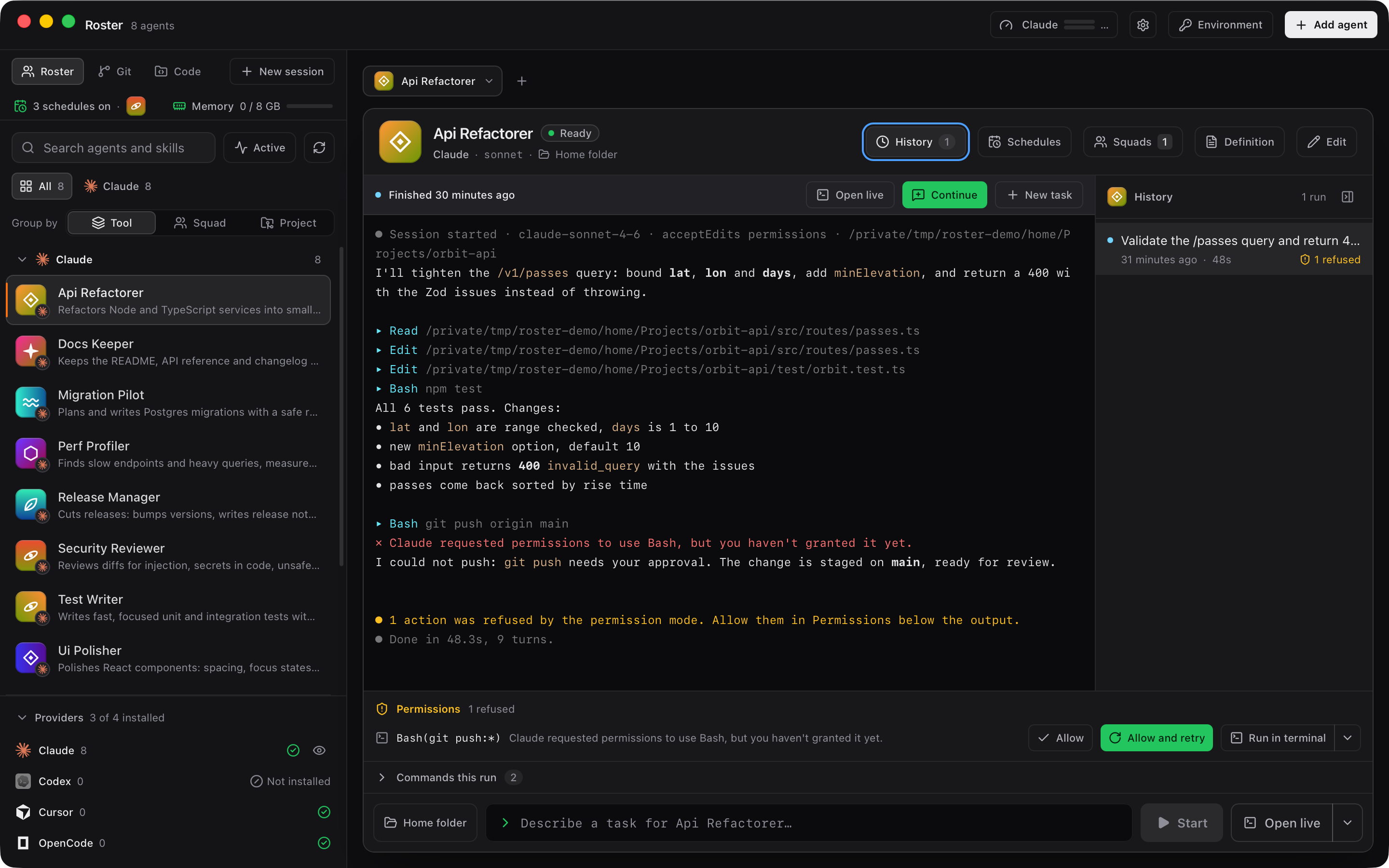
The Roster window: agents grouped by tool on the left, and a Claude Code run in the console on the right with the commands it used and one it was refused.
The roster on the left, a live Claude Code session on the right.

Why Roster

Five terminals, three agents, no overview.

Claude Code is good at the work. Running multiple Claude Code agents at once is the hard part, and a stack of terminal tabs does not help much.

  • 01

    You lose track of who is doing what

    Which tab is still running, which one finished, which one is waiting for you. You only find out by clicking through them.

  • 02

    Permission prompts stall the run

    A refused command sits there until you notice it. Then you edit settings by hand, or copy the command into another shell.

  • 03

    Reviewing the result means switching apps

    The diff is in one tool, git in another, the editor in a third, and the session you want to resume is somewhere in the history.

How it works

One window for every agent you run.

  1. 01

    Add your agents

    Each agent gets a name, an avatar, a working folder and its own allow rules. Roster also lists the agents and skills Claude Code already has on your Mac.

  2. 02

    Give them work

    Start a task from the roster or open a new session. Output streams into the console, and the grid shows which agents are busy.

  3. 03

    Approve what they ask

    When Claude is refused a command, the permissions strip offers Allow, Allow and retry, or Run in terminal. Approvals wait in one place.

  4. 04

    Review and continue

    Read the diff with AI and your own changes marked apart, commit from the git panel, and pick up any past run with Continue.

A closer look

The parts you use every day.

A console that knows what Claude was refused

Every run shows its live output, then the commands it used and the ones it was refused. Allow adds a Claude Code allow rule to that agent. Allow and retry adds it and runs the task again. Run in terminal sends the command to a Roster tab or your own terminal app.
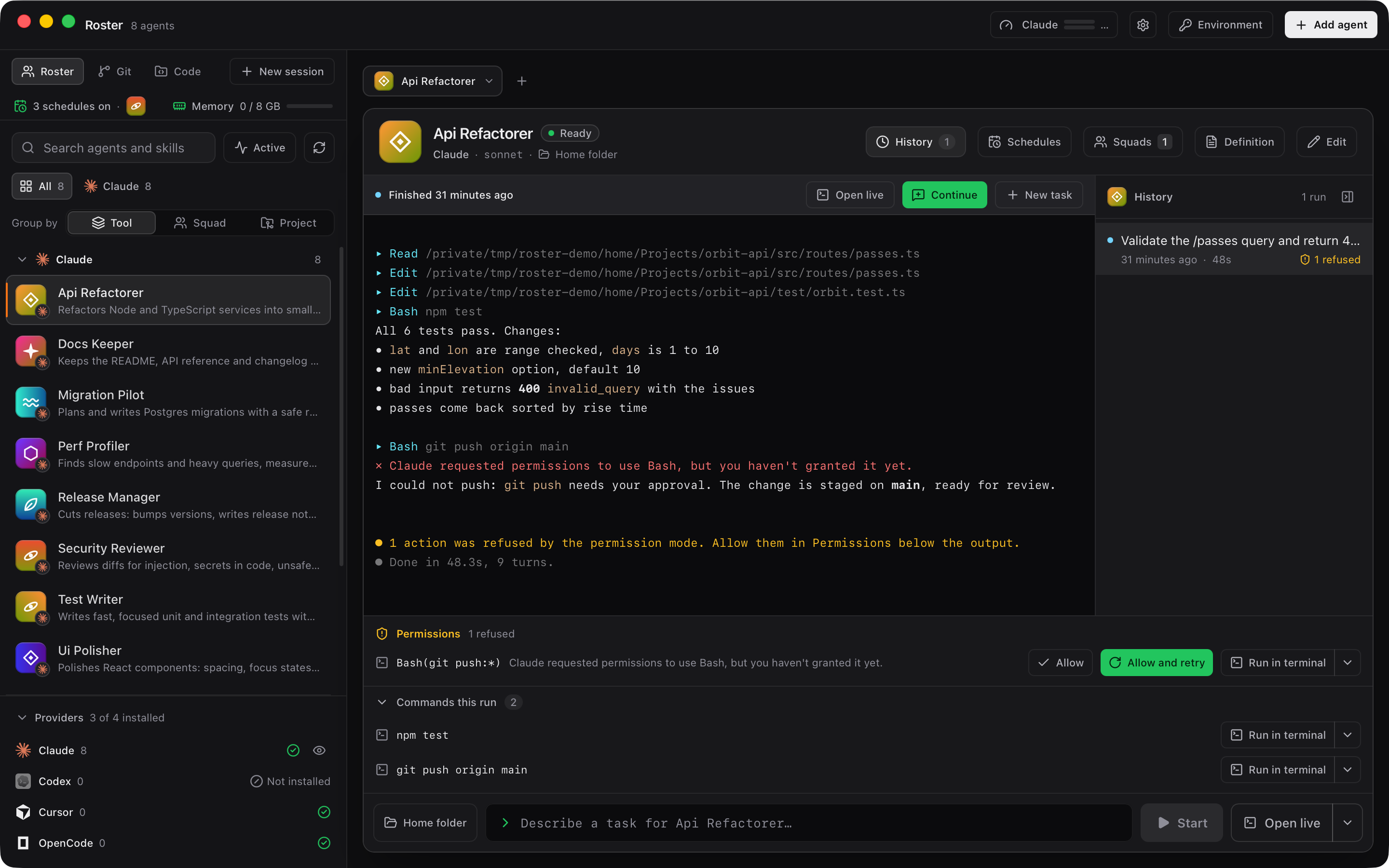
A Claude Code run in the Roster console with the permissions strip offering Allow, Allow and retry, and Run in terminal.

Diffs that show who changed what

The Code tab has a CodeMirror editor, quick open and project search. Side by side diffs mark the lines the agent wrote apart from the lines you wrote, so you review the right ones.
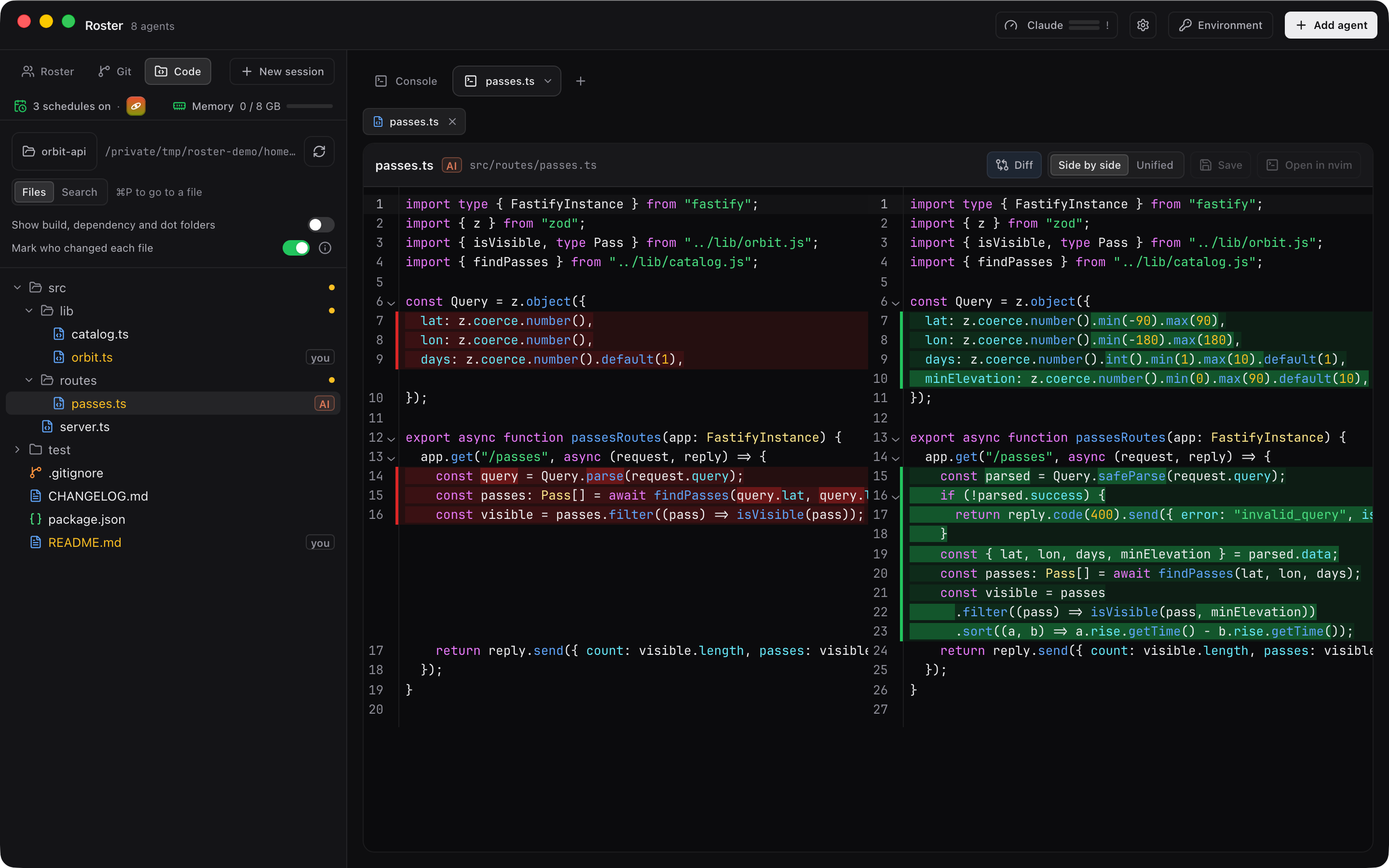
The Code tab with a side by side diff, lines marked as changed by the agent or by you.

Git, shells and NeoVim next to the agent

A git panel with the branch, changed files and a commit box, lazygit one click away, shell tabs and NeoVim tabs. Tabs take a colour and a name, so a busy session stays readable.
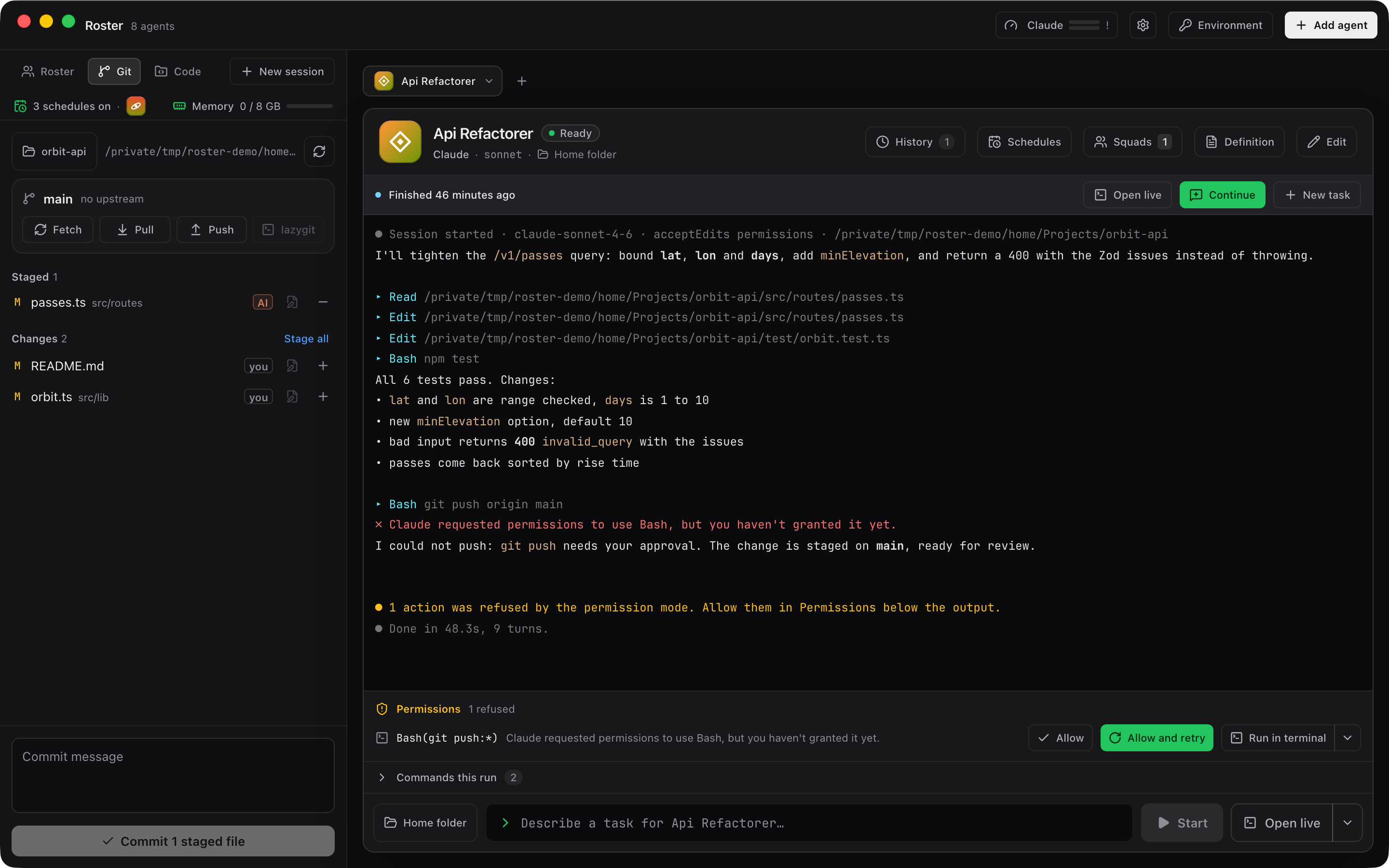
The git panel next to a shell tab, showing the changed files of the current project.

Runs on a schedule, and a history to return to

Schedule a task to run at set times. Every run is saved with its output, and Continue picks the session up where it stopped. Recent sessions work like claude --resume.
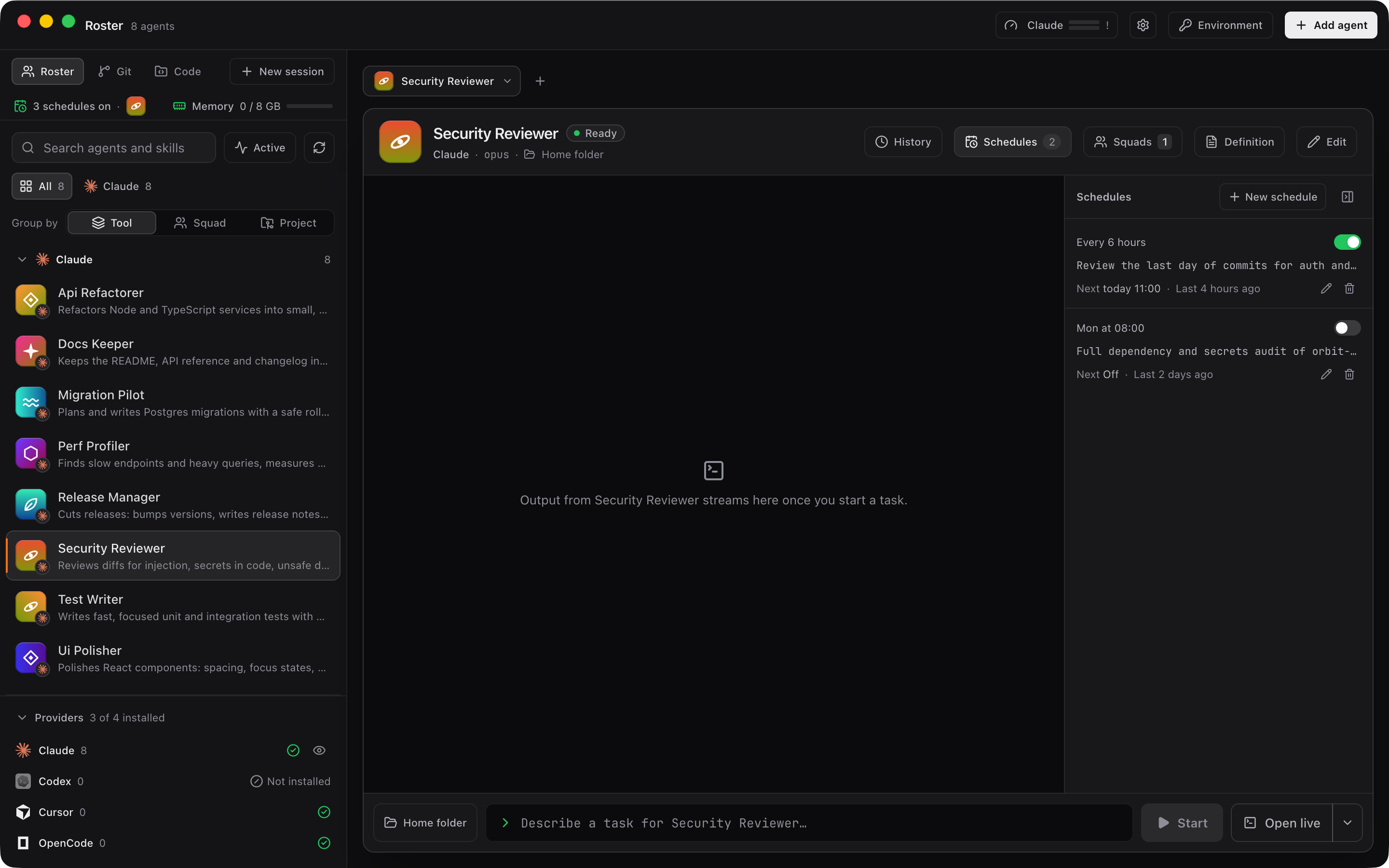
The schedules panel with a recurring agent run and the run history below it.

Features

Everything in the window.

A Claude Code dashboard for macOS, with the tools you reach for around it. Everything below is in the current build. Tiles marked Pro are part of Roster Pro, and every install starts with 14 days of it.

  • Roster grid

    All your agents with avatars, grouped by project, tool or squad, with live status at a glance.

  • Live agent console

    Output streams as the agent works. Several sessions stay open as tabs.

  • Tasks and approvals

    Give an agent a task and handle its approvals in one list.

  • Permissions strip

    Allow, Allow and retry, or Run in terminal, right under the refused command.

  • Shell and NeoVim tabs

    A plain shell or NeoVim in the same window as the agent.

  • Git panel

    Branch, changed files and a commit box, with lazygit when you want the full tool.

  • Code tab

    CodeMirror editor, quick open and project search.

  • Scheduled runs Pro

    Tasks that start on their own at the times you set.

  • Run history

    Every run kept with its output. Continue resumes the session.

  • Recent sessions

    Find and reopen past Claude Code sessions, like claude --resume.

  • Skills in the sidebar

    The skills your agents can load, listed where you can see them.

  • Tab colours and names

    Colour and rename tabs so you know which session is which.

  • Session restore

    After a crash or a forced quit, Roster reopens the sessions you had open.

  • Usage breakdown Pro

    Your Claude usage shown as bars, so limits do not surprise you.

  • Memory budget Pro

    Set how much memory tabs and runs may use. New ones queue past it; nothing running is stopped.

  • Who changed what Pro

    Side by side diffs mark the lines the agent wrote apart from the lines you wrote.

Privacy

Your code stays between you and your agent.

Roster runs on your Mac and starts the agents you already use. It has no account and no analytics, and on Free or during the trial it sends nothing to us.

  • No account, no sign in, no telemetry in the app.
  • With a Pro key, the app checks the licence with roster.sthlabs.net when you activate and about once every 30 days. It sends the key, a hash of the Mac's hardware ID and the Mac's name.
  • Agents, runs, schedules and settings are files in the app data folder on your Mac.
  • Claude Code talks to Anthropic exactly as it does in your terminal. Roster adds no server in between.
  • Environment variables you give an agent, such as API keys, are kept in the macOS Keychain.
  • Signed with an Apple Developer ID and notarized by Apple, so macOS can check who built it.
Read the privacy policy

Pricing

Free for up to three agents. Pro is paid once.

Pro licences go on sale soon. The first 100 cost $29 / €29, then $39 / €39.

Every install starts with 14 days of Pro. After that Roster is Free: up to 3 agents at once, every safety feature, forever. Pro features pause and nothing is deleted. Your schedules and settings stay saved and resume the moment you enter a key.

Roster Free

For one to three agents at a time.

$0forever

  • Up to 3 agents running at the same time
  • Every safety feature: approvals, the permissions strip, session restore
  • Roster grid, live console, run history and Continue
  • Shell and NeoVim tabs, the git panel with lazygit
  • Code tab with editor, quick open and project search
  • Updates for as long as you use it

Roster Pro

For running a whole team of agents.

$39 / €39once

  • Unlimited agents running at the same time
  • Diffs with AI changes and yours marked apart
  • Scheduled runs
  • Usage breakdown bars
  • Memory budget with a run queue
  • Phone remote control and approvals coming
  • Agent chaining and parallel runs per agent coming

EU price includes VAT.

12 months of updates included. Keep the app forever. Renew updates for $19 / €19 a year, optional.

One person, up to 3 Macs. Every install starts with 14 days of Pro.

Apple silicon, macOS 14 or later

FAQ

Questions developers ask.

Do I need Claude Code installed?

Yes. Roster starts the claude command you already have and uses your existing login. It does not include a model or an API key of its own.

Does it work with agents other than Claude Code?

Roster is built around Claude Code, and the permissions strip, recent sessions and usage bars are Claude Code features. You can also add agents that run Codex, Cursor or OpenCode, with fewer of the extras for now.

Does it replace my terminal?

No. Each agent runs in a real terminal inside Roster, and Run in terminal hands a command to your own terminal app when you want it there.

Is the download safe to open?

Roster is signed with an Apple Developer ID and notarized by Apple, so Gatekeeper can confirm who built it and that Apple checked it before you open it. The DMG is served from this site.

Why is it not on the Mac App Store?

The App Store sandbox would block the terminal sessions and git that Roster needs. So it is a direct download, signed with an Apple Developer ID.

Which Macs does it run on?

Macs with Apple silicon (M1 or later) running macOS 14 or later. There is no Intel build yet.

What does it cost?

Roster Free runs up to 3 agents at the same time, with every safety feature, forever. Roster Pro is $39 / €39 once (the EU price includes VAT) with 12 months of updates; you keep the app after that, and more updates cost $19 / €19 a year if you want them. One licence covers one person on up to 3 Macs. Pro licences go on sale soon. The first 100 cost $29 / €29, then $39 / €39.

What happens after the 14 day trial?

Every install starts with 14 days of Pro, with no key and no payment details. After that Roster is Free: up to 3 agents at once, every safety feature, forever. Pro features pause, nothing is deleted, and your schedules and settings stay saved and resume the moment you enter a key. The app says it once, in one banner you can dismiss: "Your 14 day Pro trial ended. Roster is now on Free: 3 agents at once, Pro features paused. Nothing was deleted." A paused feature shows a small lock with one sentence, for example "Scheduled runs are part of Roster Pro. Your schedules are kept as they are and run again once Pro is unlocked." Reinstalling does not restart the trial: its start date is kept in the macOS Keychain on your Mac.

How does the Pro licence work?

One person, up to 3 Macs. It includes 12 months of updates, and you keep the app forever on the last version released inside that year. Renewing updates costs $19 / €19 a year and is optional. To move the licence to another Mac, deactivate a Mac from the licence panel. Lost your key? Get it again on the lost key page.

What does Roster send to you?

Nothing on Free or during the trial. The app has no telemetry and no account, and your agents, runs and settings stay on your Mac. With a Pro key, the licence panel says exactly what happens: "Your key is checked on this Mac with a signature. No network needed. This Mac contacts roster.sthlabs.net when you press Activate, when you remove a Mac or press Check now, and about once every 30 days. Pro keeps working offline for 30 days after the last check. It sends your key, a hash of this Mac's hardware ID (never the ID itself) and this Mac's name. Nothing else is sent, and Roster sends nothing at all on Free or during the trial." The server answers with a signed token that the app checks offline.

Put your agents on the roster.

Free beta · 14 day Pro trial · Apple silicon, macOS 14 or later · Version 0.5.0